blog » self-hosted » orchestration » setup-bundled-k3s-traefik-for-dns-01
Setup the Bundled K3s Traefik Ingress for DNS-01
K3s ships with Traefik out of the box. You can replace it, but it’s simpler to configure the bundled one.
DNS-01 is the only ACME challenge that supports wildcard certificates. If you want *.mydomain.com, this is the path.
Before diving into K3s specifics, here’s the short version of DNS-01: the CA gives your server a token; your server signs it with its private key, then publishes the signature as a TXT record at _acme-challenge.mydomain.com. The CA checks your DNS, confirms the value, concludes “yes, this machine controls the domain and the private key.”, and signs your public key.
Installing K3s
Installation is one line, which is exactly the right number of lines:
curl -sfL https://get.k3s.io | sh -
If you're reading this years in the future, check the K3s Quick Start for any changes.
Traefik Static Config & certificatesResolvers
Traefik’s configuration comes in two flavors:
- Static config: defined at startup. This is where ACME lives.
- Dynamic config: loaded at runtime. This is where IngressRoutes live.
For DNS-01, we need to extend the static config. Traefik groups ACME settings under certificatesResolvers. Defining a resolver would look like this:
certificatesResolvers:
  le-dns:
    acme:
      email: acme@example.com
      storage: /data/acme.json
      dnsChallenge:
        provider: ovh
I use the ovh provider, but you can find the list of supported DNS providers in the Lego documentation.
Persistent Volume for ACME Storage
Traefik needs a writeable /data directory to store ACME certificates. Enable persistence looks like this:
persistence:
enabled: true
path: /data
size: 128Mi
accessMode: ReadWriteOnce
storageClass: local-path
DNS Credentials & Kubernetes Secret
Traefik needs to speak to your DNS provider to create the TXT records. That means credentials. The exact environment variables depend on your provider; Lego documents all of them.
Example: OVH
Docs: https://go-acme.github.io/lego/dns/ovh/
You need to know your OVH endpoint. It's either ovh-eu for Europe or ovh-ca for Canada. Mine is ovh-ca. We also need to get an “Application Key”, an “Application Secret”, and a “Consumer Key”. All of which can be generated in your OVH dashboard under “Identity, Security, and Operations / API Keys”. Here is how it looks:
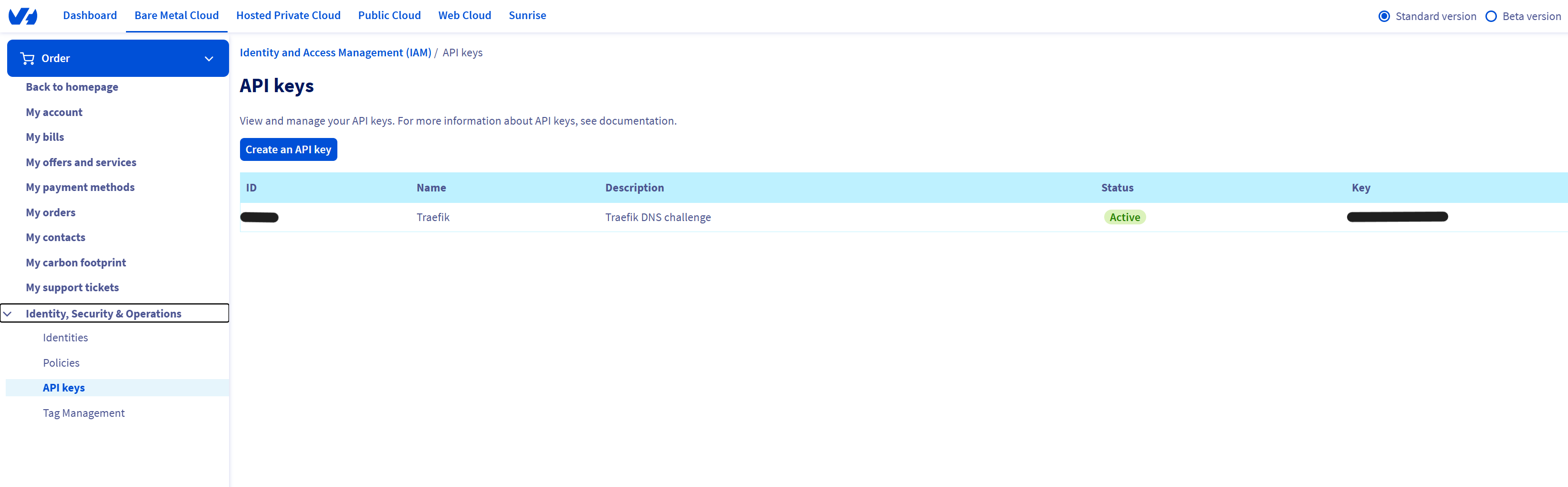
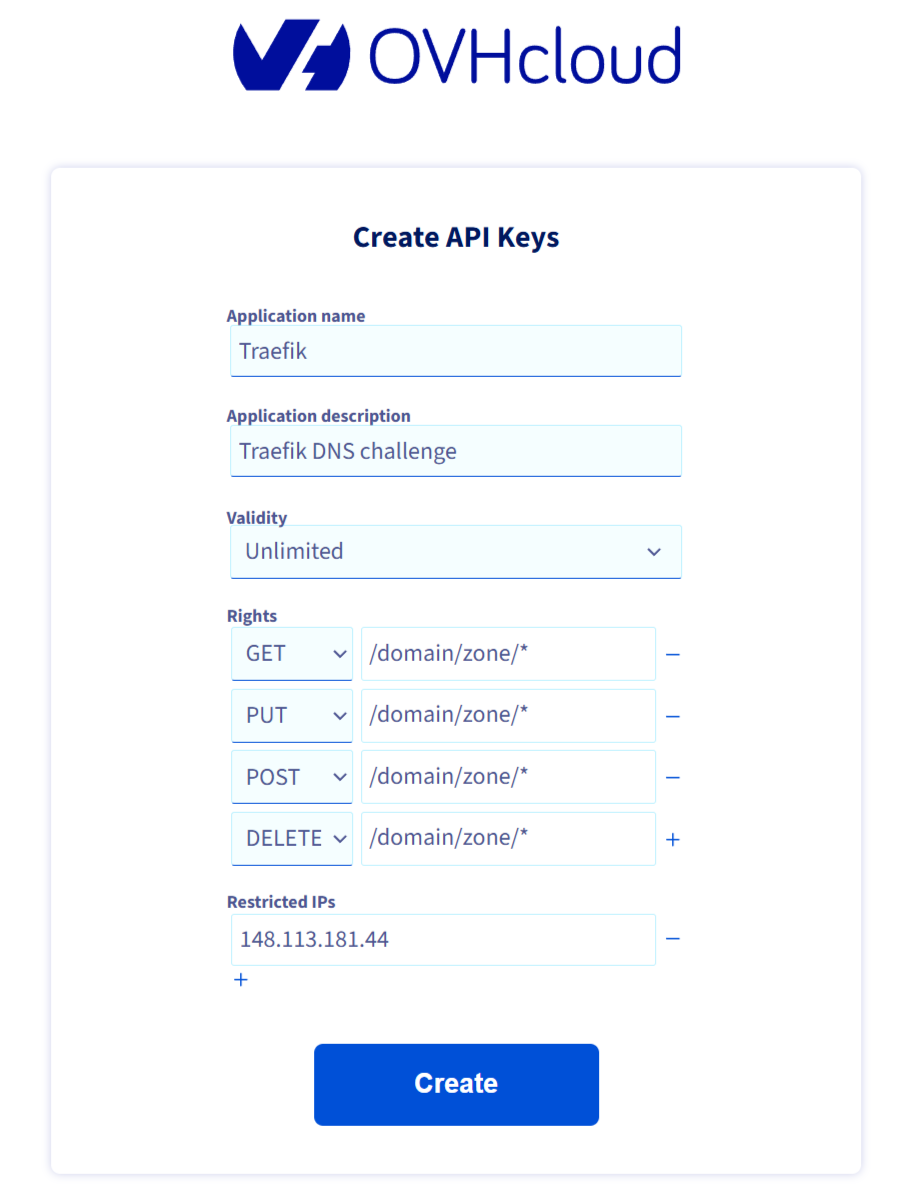
After clicking on “Create an API key”, you will need to set these values:
- Application name: Anything (for you)
- Application description: Anything (for you)
- Validity: Unlimited (unless you want to do this again)
- Rights
- GET: /domain/zone/*
- PUT: /domain/zone/*
- POST: /domain/zone/*
- DELETE: /domain/zone/*
- Restricted IPs: The IP of your server (Optional, for security)
For example:
Once that's done, create a Kubernetes secret containing the required environment variables:
kubectl create secret generic ovh-dns-secret \
--from-literal=OVH_ENDPOINT=<ovh-eu or ovh-ca> \
--from-literal=OVH_APPLICATION_KEY=<your ovh application key> \
--from-literal=OVH_APPLICATION_SECRET=<your ovh application secret> \
--from-literal=OVH_CONSUMER_KEY=<your ovh consumer key> \
-n kube-system
Adding these variables to Traefik’s static config would look like this:
env:
- name: OVH_ENDPOINT
valueFrom:
secretKeyRef:
name: ovh-dns-secret
key: OVH_ENDPOINT
- name: OVH_APPLICATION_KEY
valueFrom:
secretKeyRef:
name: ovh-dns-secret
key: OVH_APPLICATION_KEY
- name: OVH_APPLICATION_SECRET
valueFrom:
secretKeyRef:
name: ovh-dns-secret
key: OVH_APPLICATION_SECRET
- name: OVH_CONSUMER_KEY
valueFrom:
secretKeyRef:
name: ovh-dns-secret
key: OVH_CONSUMER_KEY
Modifying the Bundled Traefik Static Config (K3s-specific)
K3s manages Traefik through a Helm chart. To override its defaults, the K3s networking documentation tells us to create a HelmChartConfig under /var/lib/rancher/k3s/server/manifests/traefik-config.yaml:
apiVersion: helm.cattle.io/v1
kind: HelmChartConfig
metadata:
name: traefik
namespace: kube-system
spec:
valuesContent: |-
env:
- name: OVH_ENDPOINT
valueFrom:
secretKeyRef:
name: ovh-dns-secret
key: OVH_ENDPOINT
- name: OVH_APPLICATION_KEY
valueFrom:
secretKeyRef:
name: ovh-dns-secret
key: OVH_APPLICATION_KEY
- name: OVH_APPLICATION_SECRET
valueFrom:
secretKeyRef:
name: ovh-dns-secret
key: OVH_APPLICATION_SECRET
- name: OVH_CONSUMER_KEY
valueFrom:
secretKeyRef:
name: ovh-dns-secret
key: OVH_CONSUMER_KEY
persistence:
enabled: true
path: /data
size: 128Mi
accessMode: ReadWriteOnce
storageClass: local-path
certificatesResolvers:
le-dns:
acme:
email: acme@example.com
storage: /data/acme.json
keyType: EC384
dnsChallenge:
provider: ovh
propagation:
  delayBeforeChecks: 10
Restart Traefik:
kubectl -n kube-system rollout restart deploy traefik
You can now reference the resolver in your IngressRoute, by adding:
tls:
  certResolver: le-dns
Global certResolver (Optional)
If you want Traefik to handle HTTPS by default, you can configure websecure entrypoints globally:
apiVersion: helm.cattle.io/v1
kind: HelmChartConfig
metadata:
  name: traefik
  namespace: kube-system
spec:
  valuesContent: |-
    # ...

    entryPoints:
      # ...

      websecure:
        address: ":443"
        http:
          tls:
            certResolver: le-dns
            domains:
              - main: "mydomain.com"
                sans:
                  - "*.mydomain.com"
This gives you automatic wildcard certificates, and you no longer need the tls block in your IngressRoute.
And that’s it! Traefik now handles DNS-01 automatically through the bundled K3s ingress. Once configured, it’s fully hands-off.